Sharetribe Mobile Template: What to Build First
A mobile marketplace app should make the highest-frequency user actions faster. The first version should focus on discovery, listing detail, messaging, saved items, and checkout or booking.
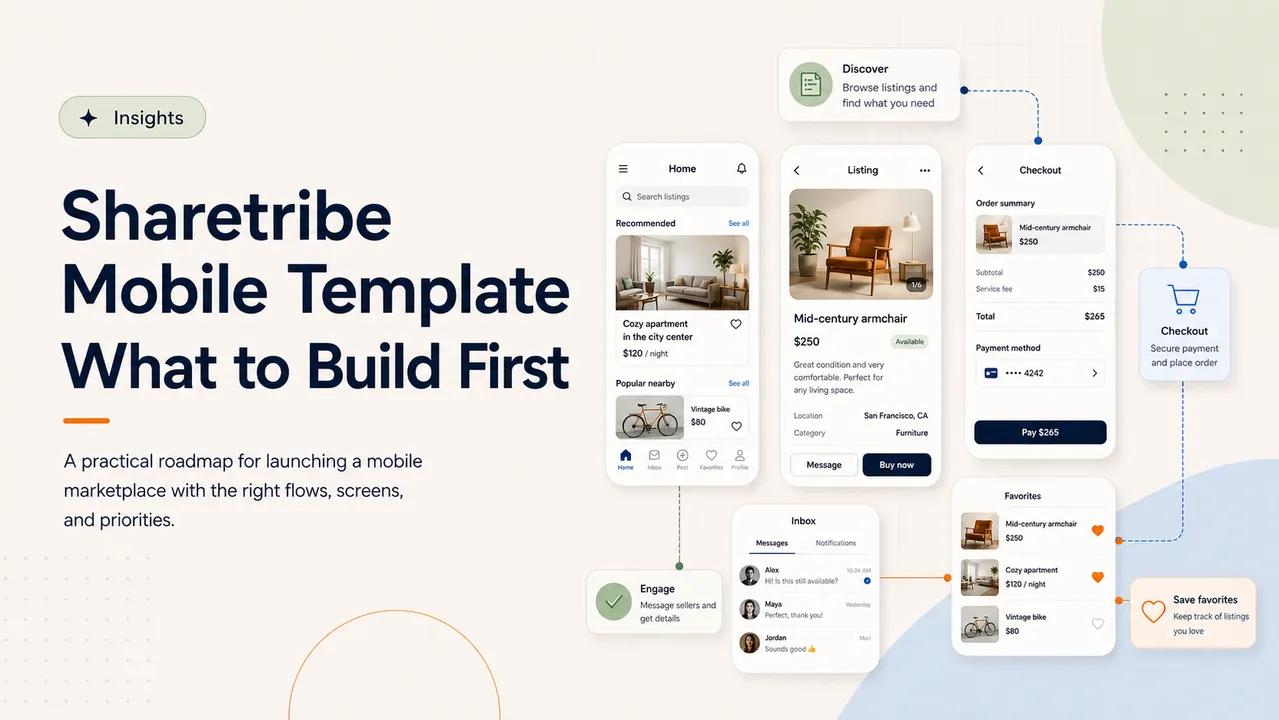
Why mobile marketplace apps need focus
Mobile apps can quickly become overloaded if the first build tries to match every web feature. The better approach is to identify what users need on the go and make those actions excellent.
For many Sharetribe marketplaces, the mobile app should prioritize browsing, messaging, notifications, saved listings, and transaction progress. Admin-heavy workflows can often stay on web until the mobile experience proves demand.
Buyer-first screens
Buyers need a fast path from discovery to confidence. The core screens usually include home, search, filters, listing cards, listing detail, seller profile, reviews, availability, messaging, and checkout or booking.
The listing detail screen matters most. It should answer the buyer's practical questions: what is included, when is it available, where is it located, who provides it, what does it cost, and what happens next.
- Home and recommended listings
- Search and category browsing
- Listing detail with media and trust signals
- Checkout, booking, or inquiry CTA
Seller/provider flows
Seller flows should be carefully scoped for the first version. A seller may need profile management, listing management, calendar updates, booking requests, order status, and messages.
If listing creation is complex, consider launching mobile with listing management and messaging first, then add full listing creation after the marketplace understands seller behavior.
Messaging and notifications
Mobile value often comes from speed. Push notifications for new messages, booking requests, order updates, payout events, and reminders can make the marketplace feel more responsive than web alone.
Messaging should connect cleanly to transaction states. A buyer asking a question before checkout, a provider confirming details, and an admin support path should all feel consistent.
Favorites and saved searches
Favorites are simple but powerful. They let users return to listings and create signals for recommendations, reminders, and re-engagement.
Saved searches are useful when inventory changes often. A user who saves a region, category, size, date range, or budget can receive alerts when relevant supply appears.
Checkout and booking considerations
Checkout and booking flows need careful product decisions. Mobile should show fees, availability, cancellation rules, seller response time, service terms, taxes, and payment status clearly.
If the marketplace uses booking, the mobile app also needs a reliable way to handle time zones, date changes, unavailable slots, reschedule requests, and cancellation states.
MVP vs later-stage features
A strong mobile MVP does not need every admin feature, every analytics view, or every edge-case setting. It needs the core user journey to feel smooth and trustworthy.
Later-stage features can include advanced seller dashboards, analytics, promotions, loyalty, AI recommendations, offline support, multi-language content, and deeper admin tools.
Key takeaway
Build the mobile marketplace around high-frequency user actions first. Discovery, listing detail, messaging, notifications, favorites, and transaction flow usually matter more than feature parity.
Related articles
Keep reading
AI + Sharetribe: Practical Automation for Marketplaces
Use AI to improve discovery, support, moderation, and operations in real marketplace workflows.
Sharetribe Marketplace Development Guide
Core architecture, listing flows, transactions, and extensions for building a scalable marketplace.
Custom Transaction Processes in Sharetribe
How tailored workflows can support bookings, offers, shipping, payouts, and edge cases.
Work With DevsCrew
Building a marketplace or AI product?
We help founders and teams design, build, and scale Sharetribe marketplaces, AI features, mobile apps, and complex product workflows.